
Enterprise service management (ESM) is the practice of running non-IT departments on the service delivery methods built for IT: request tracking, a service catalogue, defined response times, and a self-service portal. The discipline that organised the IT help desk gets applied to HR, finance, facilities, legal, and procurement.
For a VP of Operations or an IT Head, the starting point is usually a patchwork. HR runs onboarding on email and a spreadsheet, facilities takes requests through a shared inbox, and IT has a ticketing tool no other team is allowed to change.
A 2024 study by HDI found that 52% of organisations now apply service management practices outside IT, most often in customer service, HR, and operations. This guide covers what ESM means, how it differs from ITSM, which departments use it, and how to start. The examples come from real deployments of DGlide's no-code service platform.
TL; DR
ESM runs HR, finance, and facilities on the same request tracking the IT help desk already uses.
It does not replace ITSM. It reuses the same service catalogue, ticketing, and knowledge base for more teams.
Onboarding, expense approvals, and facility access are the requests where ESM pays back first.
The rollout stalls the first time a non-IT team files an IT ticket to change its own form.
Require a platform where an operations manager edits a workflow without code.
Start with one department and one high-volume request, then expand on the data.
What exactly is enterprise service management?
Enterprise service management is the use of IT service management practices in departments that are not IT. The same parts get set up for HR, finance, facilities, legal, and procurement: a request form, a queue, an owner, a response-time target, and a knowledge base.
Without ESM: a new hire's laptop request sits with IT, the desk request sits with facilities, and payroll setup sits in a third inbox. Each is a separate email thread, and the step that gets missed is the one nobody was formally assigned.
With ESM: one submitted form routes all three, each with an owner and a due date on one screen. It is a method, not a single product, and most companies run it on the platform they already use for the IT service desk.
How is ESM different from ITSM?
ITSM manages IT services for the IT department. ESM takes those same practices and runs them for every other department, so what changes is who uses them and for what.
The overlap is large, which is why most companies run both on one platform. The table shows where they line up and where they differ.
| IT service management (ITSM) | Enterprise service management (ESM) |
Who it serves | The IT team and anyone raising IT tickets | HR, finance, facilities, legal, procurement, and their internal customers |
Typical requests | Password resets, access requests, incidents, change management | Onboarding, expense approvals, desk moves, contract reviews, vendor setup |
Shared parts | Service catalog, ticketing, SLAs, knowledge base, self-service portal | The same service catalog, ticketing, SLAs, knowledge base, and portal |
Framework | Usually built around ITIL practices | Borrows the same structure, adapted to each department's language |
Goal | Keep IT services running and auditable | Make every internal service request trackable and owned |
This is why ESM is called an extension, not a replacement. The service catalogue and ticketing engine that already work for IT get pointed at more teams, often on one platform that handles IT and non-IT workflows together.
The difference that decides whether ESM works
Most guides frame ESM as a tool decision: pick an IT platform, buy more seats, add modules for HR. In our deployments for airport operations and manufacturing service desks, that is not where projects succeed or fail.
They stall the first time an HR lead wants to change a form field and is told to raise an IT ticket and wait a week. ESM works when each team can adjust its own workflow without booking IT time, and most legacy suites make that hard.
Which departments use enterprise service management?
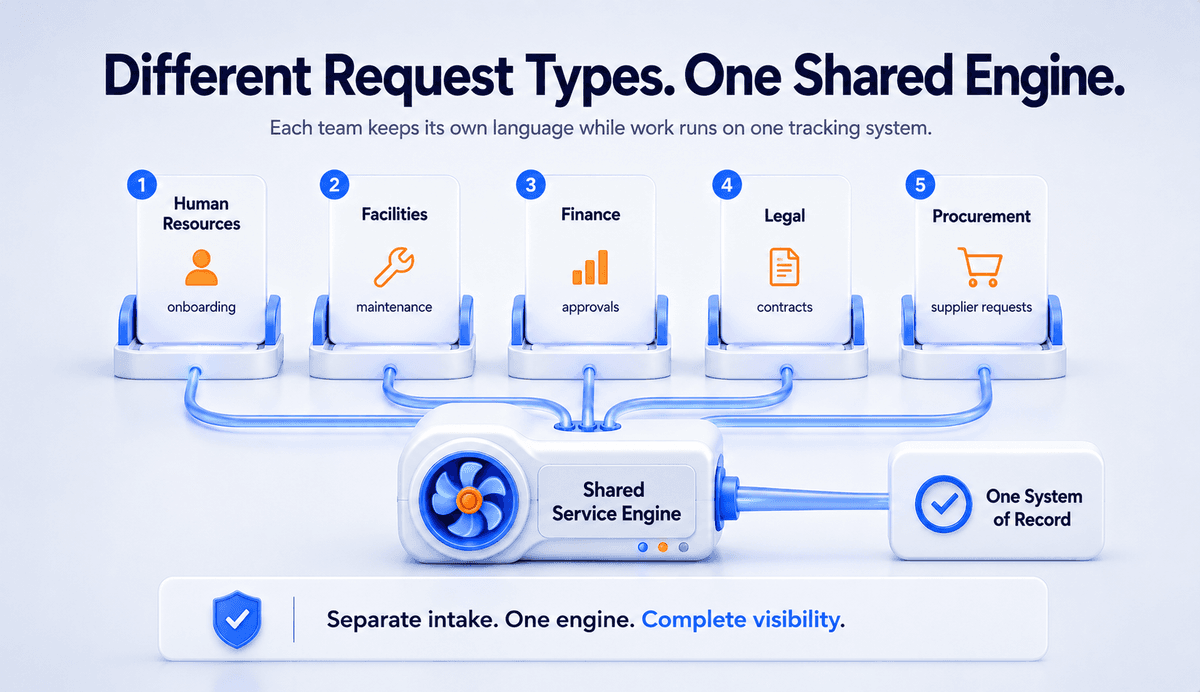
Any department that takes requests from employees can use enterprise service management. Five show up first because their request volume is high and the steps repeat. Each keeps its own language while running on shared tracking.
These are the teams where an ESM rollout usually starts.
Human resources. Onboarding, offboarding, leave questions, benefits changes. One onboarding request triggers tasks for IT, payroll, and the hiring manager at once.
Facilities. Maintenance tickets, desk moves, and building access, each with a queue and an owner instead of one overloaded inbox.
Finance. Expense approvals, purchase requests, and vendor setup, with every step logged so an approval is never stuck with an unnamed “someone”.
Legal. Contract reviews and NDA requests, where a standard intake form replaces the email back-and-forth that delays every review.
Procurement. New supplier requests and renewals, with the request, the approval, and the paperwork in one record.
The pattern is the same across all five. Before ESM, the record for a broken air conditioner is whoever complains loudest in the Monday stand-up. After, it is a ticket with a timestamp, an owner, and a due date.
If your facilities and HR requests still land in shared inboxes that nobody formally owns, see how DGlide gives each one a queue and a deadline.
What are the benefits of enterprise service management?
The benefit of enterprise service management is that shared work stops falling through the gaps between departments. Every request gets an owner, a deadline, and a status anyone can check, and reporting then shows where the delays actually sit.
Take onboarding, which touches four teams at once. A manufacturing company we worked with ran it on email, with HR sending separate messages to IT, facilities, and payroll for every hire.
Before: four email threads per hire, no shared status, two to three missed steps a month.
After: one request, each step owned and dated, missed steps near zero within a quarter.
The same structure applies to expense approvals, access requests, and contract reviews. For a longer case, see an airport operations team that built ticketing and lost-and-found in weeks.
What should you look for in ESM software?
Good ESM software lets a non-technical team build and change its own service workflows. The real test is whether an operations manager can set up a new request type without writing code or filing an IT ticket. Four capabilities matter more than a long feature list.
No-code workflow builder: Without it, every form change needs a developer or a vendor ticket. Look for drag-and-drop building a department lead uses directly.
One service portal: Without it, HR, facilities, and procurement each run a separate inbox. Look for a single place for any request, with each team's own catalogue behind it.
Automated routing and response-time timers: Without it, someone assigns tickets by hand each morning. Look for rules that route by team, location, or skill, with a visible deadline on every request.
Cross-department reporting: Without it, no one sees where handoffs stall. Look for one view that tracks resolution time across IT, HR, and facilities.
The AI features now standard in ESM software, request classification and ticket summaries, only help if the team that owns the process can configure them.
Still assigning tickets by hand every morning across three teams? DGlide routes them by skill and location automatically.
How do you get started with enterprise service management?
Getting started with enterprise service management works best as one narrow project, not a company-wide launch. Pick one department, one common request, and a defined response time, then prove it for a quarter before expanding.
ESM is not always the right first move. If you run fewer than 100 employees, or every team already shares one light tool that works, a formal platform adds process you may not need. When request volume and missed handoffs start costing real hours each week, it earns its place.
A first rollout usually follows five steps.
Pick one department. HR or facilities are common starting points because request volume is high and the steps repeat.
Choose one request type. Onboarding, access requests, or maintenance tickets work well as a first workflow.
Set a response-time target. Agree what “done” means and how many days each step gets.
Reuse a platform you have. If IT already runs a ticketing tool, extend it before buying another.
Assign an owner. Among mature adopters, 58% run a dedicated service management office for exactly this, according to HDI.
Those five steps have not changed in years. One thing has, and it should shape the questions you ask vendors during a demo.
What has changed for ESM in 2026
The pressure in 2026 is to add AI agents to service workflows. Gartner expects 40% of enterprise applications to include task-specific AI agents by the end of 2026, up from less than 5% in 2025. For ESM the practical question is whether a non-technical team can configure and supervise those agents, or whether every change routes back to IT and the vendor.
Before you shortlist tools, read where DGlide fits and where it does not against ServiceNow, Freshservice, and ManageEngine.
Why should you choose DGlide?
If you are extending service management past IT, you are probably running ManageEngine for the IT desk and email or WhatsApp for everything else. DGlide runs both on one no-code platform, so HR, facilities, and finance requests get the same tracking as an IT ticket.
A workflow builder an operations manager uses without code, so HR edits its onboarding steps without an IT request
One portal for every department, replacing separate inboxes for facilities, HR, and procurement
Automated routing with response-time timers, so each request has an owner and a deadline on submission
One reporting view, so a COO sees where onboarding stalls across IT, facilities, and finance
DGlide deploys in days to weeks, not the six to twelve months common with legacy suites. Business users configure it without a dedicated consultant, at roughly 40% lower IT cost than legacy vendors.
vs ManageEngine: workflows change by drag and drop, not scripting.
vs Freshservice: AI and automation are included, not priced as add-ons.
vs ServiceNow: deployment runs in weeks against an average of six to twelve months.
vs email and WhatsApp: every request has a timestamped, searchable record.
DGlide is built for mid-market operations teams in aviation, manufacturing, logistics, and FMCG. It is not the right fit for 5,000-user global rollouts with a complex CMDB: that is ServiceNow's genuine strength. Book a free 15-minute demo
Conclusion
Enterprise service management is one method for requesting, tracking, and fulfilling services, applied to every department instead of only IT. It reuses the service catalog, ticketing, and response-time rules that already work for the help desk, and the value shows up as fewer missed requests and a clear owner for every task.
For a VP of Operations or an IT Head, the move that matters is narrow. Pick one department, one high-volume request like onboarding, and run it on a no-code service platform built for operations teams with defined response times for a quarter. If the numbers hold and the team can edit its own workflow, expand from there.
FAQs
The questions below come up in almost every ESM evaluation. The answers are short enough to lift straight into an internal brief.
What does ESM stand for?
ESM stands for enterprise service management. It applies ITSM practices to non-IT teams like HR, finance, and facilities. Each team uses one system to receive and track requests.
What is the difference between ITSM and ESM?
ITSM manages services for the IT department only. ESM applies the same practices to every other department. Both use a service catalogue, ticketing, and a knowledge base. ESM extends ITSM rather than replacing it.
What are examples of enterprise service management?
Examples include employee onboarding, expense approvals, and access requests. Facilities maintenance and vendor onboarding also qualify. Each request follows a set workflow with one owner. Progress stays visible on a shared portal.
Do you need ITSM before starting ESM?
You do not need a mature ITSM setup first. Many teams start ESM directly in HR or facilities. Reusing an existing ticketing platform helps if you have one. Starting with one department keeps the first rollout simple.