
Quick Answer: IT asset management software tracks the hardware, licenses, and systems an IT team is responsible for, and links that record to the tickets and changes tied to each asset.
Key points covered in this article:
Why IT asset management gets sold as a CMDB project
Whether mid-market IT teams actually need a full CMDB
What day-to-day asset and change visibility looks like
What breaks when asset tracking is an afterthought
What to prioritize when evaluating this software
IT asset management software tracks every laptop, server, license, and system an IT team owns, then ties that record to the tickets raised against it. Most mid-market IT teams already do half of this by hand, in a spreadsheet nobody fully trusts.
A ticket comes in about a login issue or a server alert, and the agent has no idea what else touches that machine or what changed on it recently. The asset list lives in a spreadsheet, the ticket lives in another tool, and the two drift apart within a month. A request like “show me what changed on this system in the last 90 days” then has no clean answer.
A report by Gartner found that worldwide IT spending will grow 14.2% in 2026, reaching $6.37 trillion. Most of that growth is landing on software and IT operations tooling, not headcount. This article covers what IT asset management software actually needs to do for a mid-market team, and when a full CMDB stops being worth it.
Key Takeaways
Mid-market IT teams usually need asset-and-change visibility linked to tickets, not a full CMDB.
The gap that causes the most ticket confusion is assets nobody assigned an owner to, not missing hardware.
Real asset visibility is a workflow problem. The ticket and the asset need to share one data model.
Most asset-tracking failures show up as license waste, ghost approvals, and silent SLA breaches, not one dramatic outage.
Evaluation criteria should scale to team size. Prioritize configurable fields and shared data over standalone discovery tooling.
What Is IT Asset Management Software?
IT asset management software is the system of record for every device, license, and cloud subscription an IT team owns. It typically covers discovery, ownership, lifecycle status, and cost, the same ground tools like ServiceNow’s asset module or Snipe-IT cover at different scales. For a mid-market team, the real question is how much of that they actually need.
Most IT asset management software organizes this work the same general way, even when vendors package it differently. A working definition usually includes:
Hardware inventory. Laptops, servers, network gear, and their assigned owners
Software and license tracking. What’s installed, paid for, and actually used
Lifecycle status. Purchase date, warranty, depreciation, and retirement
Change history. What was modified on an asset, and when
Most vendors sell this as a standalone category, separate from the ticketing tool an IT team already runs. The asset record and the ticket record need to be the same record, not two systems an admin reconciles by hand.
Do Mid-Market IT Teams Actually Need a Full CMDB?
Most content on this topic treats it as a technical distinction. A CMDB maps relationships between assets and services, while asset management just tracks the assets themselves. That distinction is accurate and mostly beside the point for a mid-market IT team, where the real question is headcount, not architecture.
A report by IBM found that the global average cost of a data breach reached $4.99 million in 2026, a 12% increase and a new record. Unmanaged or poorly tracked systems are a recurring factor in breaches that take longest to contain, but that is not automatically a case for a full CMDB rollout.
In practice, IT asset management software gets pitched as one thing when it is really two different jobs sold under one label.
Full CMDB. Automated discovery, configuration-item mapping, and dependency graphs, built for large or complex estates
Asset and change visibility. Knowing what a device is, who owns it, and what changed on it recently, linked to the ticket an agent is already working
A team running Freshservice or Jira Service Management for tickets, with a separate spreadsheet for assets, pays the first option’s complexity without getting its benefit. For a mid-market IT team, the second job, not the first, is usually the one that’s actually unstaffed. DGlide’s approach to ITSM and digital transformation covers this tradeoff in more depth.
How Do You Get Real Asset and Change Visibility Day to Day?
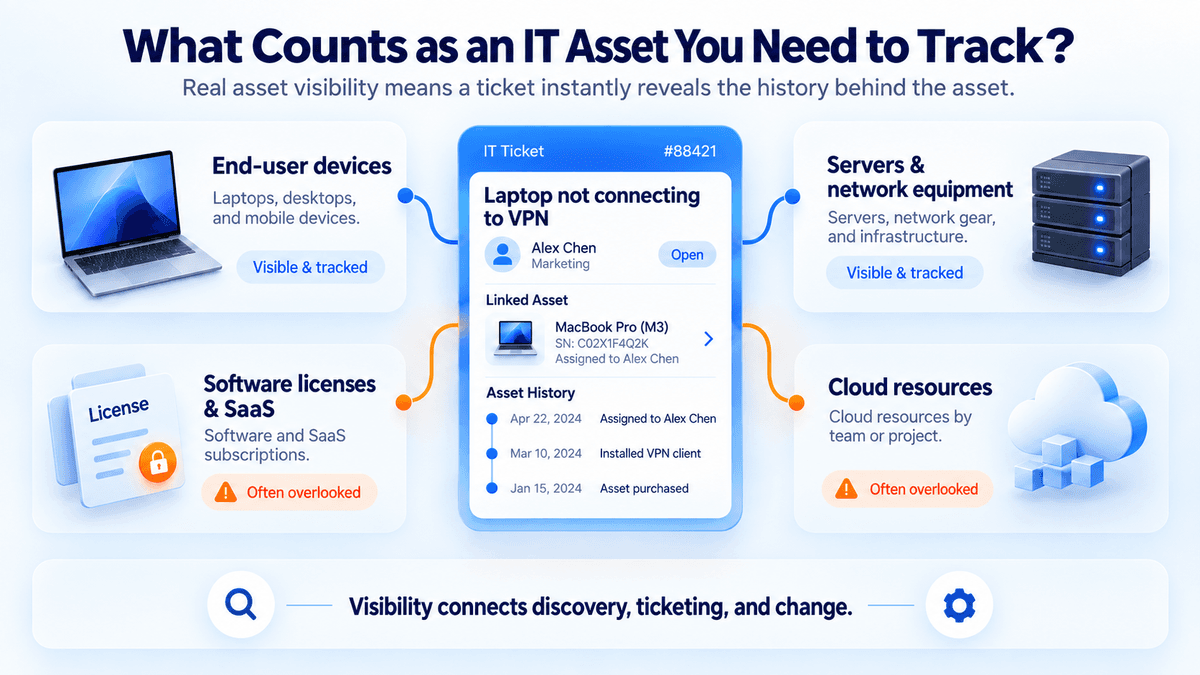
Real asset and change visibility means an agent opens a ticket and immediately sees the asset’s history, not just its name. Tools like Lansweeper or Asset Panda solve the discovery half of that problem well. Connecting that asset to the ticket and the change log is the harder, workflow half.
What Counts as an IT Asset You Need to Track?
The core list is hardware, licenses, and the systems that connect to them. Most teams already track the obvious ones and miss the rest.
Laptops, desktops, and mobile devices
Servers, network equipment, and on-prem infrastructure
Software licenses and SaaS subscriptions nobody remembers approving
Cloud resources tied to a specific team or project
Hardware is easy to count. Licenses and forgotten cloud resources are where budget quietly leaks.
Day to day, that visibility runs on a simple, repeatable loop.
A ticket opens against a named asset, not free text
The agent sees the asset’s history, including past tickets, recent changes, and current owner
Any change made during resolution gets logged against the asset
The next agent who touches it inherits that context automatically
None of this requires network-wide automated discovery.
See how service teams put this into practice once the ticket and the asset share one data model.
What Breaks When Asset Tracking Is an Afterthought?
When IT asset management is an afterthought, the damage rarely shows up as one big failure. It shows up as duplicate licenses, ghost approvals, and SLAs missed because nobody flagged a change. A report by Gartner found that 40% of enterprise applications will carry task-specific AI agents by the end of 2026, up from under 5% in 2025, and those agents need structured asset data to act on, not a spreadsheet.
These failures are predictable enough to name in advance.
License waste. Seats auto-renew long after the team using them has shrunk
Ghost approvals. Routing still points to an employee who left months ago
Silent SLA breaches. A fix ships without knowing a related change was already scheduled
Audit scramble. A 90-day change history request that nothing can answer
Each of these is a visibility gap, not a tooling gap. A team running Jira Service Management can hit every one of them even with a fully licensed tool, if asset and change data isn’t linked to the ticket.
Still tracking IT assets in a spreadsheet that falls out of sync with your ticketing tool within a month? See how DGlide links assets and changes to every ticket.
What Should Mid-Market IT Teams Look for in IT Asset Management Software?
The right evaluation criteria depend on team size, not industry. A report by IDC found that agentic AI will account for more than 26% of worldwide IT spending by 2029, reaching $1.3 trillion, which means the software bought this year needs to hold data an AI agent can actually use later.
If your team looks like this | Prioritize this |
A few hundred tickets a month, two to four IT admins | Ticket-linked asset visibility, not standalone discovery |
Assets and tickets live in separate tools today | A shared data model, not another integration to maintain |
No dedicated CMDB owner on the team | Change tracking, not full dependency mapping |
Adding new asset types as the business grows | Configurable fields, not a fixed schema |
None of this rules out a full CMDB later. It just means most mid-market teams are solving the wrong problem first.
Why Should You Choose DGlide?
Teams running Freshservice, Jira Service Management, or ManageEngine ServiceDesk Plus, with assets in a separate spreadsheet, have exactly the gap this article covers. DGlide’s ITSM keeps asset and change data inside the ticket itself.
Assets linked to tickets and history
Change tracking with a basic calendar
No-code workflow and approval changes, no developer needed
AI-assisted triage included, not a paid add-on
A report by G2 found that enterprise software buyers are settling into smaller initial commitments and demanding faster time to value. DGlide’s ITSM is built to go live in weeks on a fixed scope, not a months-long rollout.
Vs. ServiceNow. No consultant-led CMDB build-
Vs. Freshservice or Jira. Asset context built in, not bolted on
Vs. a spreadsheet plus your ticketing tool. One system, not two that drift apart
DGlide won’t replace a dedicated enterprise CMDB built for deep, network-wide discovery. For a mid-market team that needs asset and change visibility tied to every ticket, it’s built for exactly that. See it running on your own service workflow.
Conclusion
IT asset management software gets sold as a choice between a standalone tracker and a full CMDB, but most mid-market IT teams need neither one first. What they need is the asset and change record living inside the same system as the ticket.
For an IT Head evaluating this now, the practical shift is dropping CMDB-first criteria and asking whether asset data is actually linked to tickets today. Teams that fix that usually find they’ve already solved most of what they thought needed a CMDB. DGlide’s configurable operations platform carries that same context into FSM, CRM, and internal ops workflows as those needs show up.
FAQs
What is the difference between IT asset management and a CMDB?
The difference is scope. IT asset management tracks what an asset is and who owns it. A CMDB also maps how that asset connects to other systems. Most mid-market IT teams need the first one solved before the second one matters.
What is the best free software for IT asset management?
Snipe-IT is a genuinely good free option for pure asset tracking. It works well when a small IT team just needs an inventory list. It gets harder once tickets, approvals, and change history need to sit alongside it.
What are examples of IT assets a mid-market IT team needs to track?
The core list is laptops, servers, licenses, and network devices. Cloud subscriptions and SaaS seats count too, even though they’re easy to forget. The ones nobody owns cause the most ticket confusion.
What is the role of IT asset management in ticket resolution?
Asset data gives an agent context the moment a ticket opens. They see what the device is, its history, and what changed recently. That context usually separates a five-minute fix from a half-day investigation. See how ticket-linked context works in practice.