
What Is CRM? Core Components, Types, and How to Actually Choose One
CRM stands for Customer Relationship Management, a system that centralizes every interaction a business has with a lead or customer, from a first sales call to a support ticket months later. Businesses use it because that history otherwise lives scattered across inboxes, spreadsheets, and one salesperson's memory. The goal is not the software itself, it is one place everyone on a team can trust as accurate.
For an operations or sales lead evaluating a CRM, the practical question is rarely "what does CRM mean." It is which components actually matter, which type fits the size of the team, and how to choose without getting talked into features nobody will use.
A found that the global CRM market is projected to grow from $90.10 billion in 2025 to $304.03 billion by 2035. This piece covers what a CRM actually includes, the types available, and how to choose one, including where DGlide's CRM fits for operations-heavy teams.
TL;DR
A CRM is a centralized record of every customer interaction, not just a sales pipeline tool.
The ROI figures quoted on most "what is CRM" pages come from vendor-sponsored research, not independent audits.
Roughly 70 percent of CRM projects fail to meet their stated objectives, mostly for people and process reasons, not the software.
Operational, analytical, and collaborative CRM solve different problems, and most businesses need pieces of all three.
DGlide's CRM fits teams that also want service and operations workflows on the same platform, not sales alone.
What Is CRM?
CRM is software that stores and organizes every touchpoint a prospect or customer has with a business: sales calls, marketing emails, support tickets, and contract history, all attached to one record.
Before a CRM, that history is split across a salesperson's inbox, a spreadsheet, and a support tool that never talks to either. Most CRM systems fall into three types, based on what they are built to do.
Operational, Analytical, and Collaborative CRM
An operational CRM runs the daily front-office work: sales automation, marketing automation, and service automation. An analytical CRM looks backward at the data a team already has, spotting trends, segmenting customers, and informing pricing.
A collaborative CRM focuses on sharing that customer record across departments, so sales, marketing, and support are not each working from a different version of the truth.
Most growing businesses need pieces of all three, which is why the "type" question matters less than which components a platform actually covers well.
Why Most CRM Rollouts Underperform the Numbers You Are Shown
Most CRM rollouts underperform because the ROI figures used to sell them are not independent, and the reasons rollouts stall have little to do with the software. A study found that roughly 70 percent of CRM projects fail to meet their objectives, with over 60 percent of failures traced to people-related resistance and inadequate training rather than the technology itself.
The problem: the CRM ROI stat repeated across nearly every "what is CRM" page traces back to Nucleus Research studies. An analysis found that Nucleus Research's own published CRM ROI figures have moved from $5.60 to $8.71 to $16.97 per dollar spent across different vendor-sponsored studies, depending on which vendor funded the research that year. As of 2026, most pages are still quoting the 2014 figure as settled fact.
The solution: treat any single ROI number as marketing, not a forecast, and judge a CRM instead on whether the team you already have will actually use it daily.
In CRM deployments we have run for operations teams, the platforms that stalled were rarely missing a feature. They were the ones where a rep had to leave their existing workflow, WhatsApp or email, to log anything at all.
If your last CRM rollout stalled because reps went back to spreadsheets within a month, that is a rollout problem, not a feature gap. Talk to us for 15 minutes about what actually drives adoption.
What Are the Core Components of a CRM?
A CRM's core components are contact management, sales pipeline tracking, automation, and analytics, and a platform missing any one of these is not a complete CRM. These four show up under different names on nearly every vendor's page because they map to what a growing sales team actually does every week.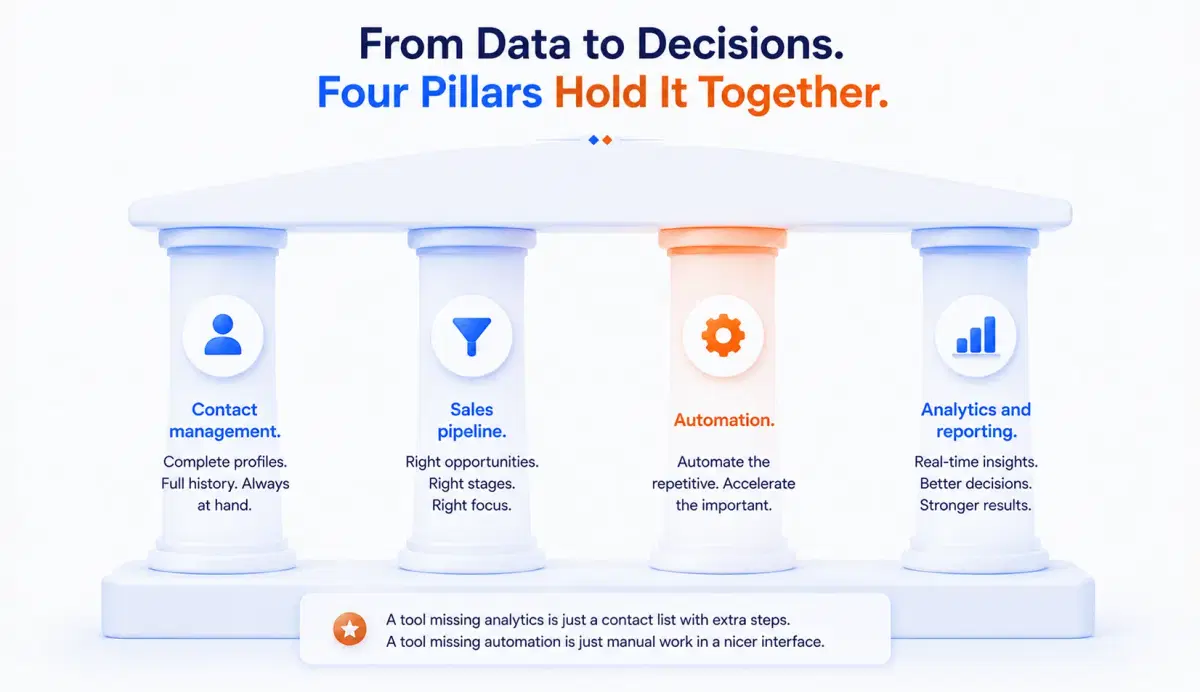
Contact management. Stores every lead and client's profile, communication history, and purchase history in one place instead of split across inboxes.
Sales pipeline. Visualizes deals moving through stages like lead, contacted, proposal sent, and closed, so forecasting is not a guess.
Automation. Handles repetitive work, follow-up emails, lead assignment, ticket routing, without a rep doing it by hand every time.
Analytics and reporting. Turns the data already in the system into a real-time view of revenue and team productivity.
None of these four are optional add-ons. A tool missing analytics is a contact list with extra steps, and a tool missing automation just moves manual work into a nicer interface.
Still exporting your pipeline to a spreadsheet to see real numbers? See what live pipeline analytics looks like in a 15-minute walkthrough.
How Do You Choose the Right CRM for Your Business?
Choose a CRM by first mapping your current workflow, then testing features against that workflow, not a vendor's demo script. Skipping straight to a feature comparison is how most teams end up paying for modules nobody on the team ever opens.
Identify your goals first. Look at your actual customer retention rate, conversion rate, and where deals currently stall before touching a vendor site.
Evaluate features against that list. Contact management, pipeline tracking, automation, and reporting should map directly to the gaps you found in step one.
Weigh the practical factors. Business size, budget, and how steep the learning curve is for the team who will use it daily matter as much as the feature list.
Test before you commit. A free trial or live demo will show whether the workflow feels natural, which no feature list will tell you.
One honest note: if you need deep, industry-specific compliance modules, healthcare or financial services workflows, or customization across thousands of seats, an enterprise platform like Salesforce is the more honest fit than a mid-market CRM.
Why Should You Choose DGlide?
If you are choosing a CRM because your team's contact history, deal stage, and support tickets live in three different tools, DGlide's CRM puts lead management, pipeline tracking, and service workflows on one no-code platform.
Contact and pipeline data sit alongside service tickets and operations workflows, not in a separate app.
AI-powered insights are included, not a paid add-on bolted onto the base plan.
No-code workflow automation lets a sales or ops manager change a routing rule directly.
DGlide typically deploys in days to weeks, at roughly 40 percent lower cost than legacy platforms, with no specialist required to configure it.
DGlide fits operations-heavy mid-market teams that want sales, service, and workflow automation together, not enterprise accounts needing deep vertical compliance modules. Book a free 15-minute demo to see it on your own pipeline.
Conclusion
A CRM is not defined by its sales pipeline alone. It is the single record a business trusts for every customer interaction, built from contact management, automation, and analytics working together.
For a team choosing one now, the practical move is to map your actual workflow before a single demo, and to treat any ROI stat you are shown as a starting point, not a guarantee. The CRM that lasts is the one your team still uses in year two, not the one with the best homepage.
FAQs
What does CRM stand for?
CRM stands for Customer Relationship Management. It is software that centralizes sales, marketing, and support interactions. The goal is one trusted record per customer, not several.
What are the main types of CRM systems?
The three main types are operational, analytical, and collaborative CRM. Operational CRM automates daily sales and service work. Analytical CRM reports on trends, and collaborative CRM shares data across departments.
Why do so many CRM implementations fail?
Most CRM implementations fail for people and process reasons, not the software itself. Around 70 percent of projects miss their stated objectives. Poor training and resistance to change cause most of that failure.
Is DGlide a good CRM for growing operations teams?
Yes, DGlide fits operations-heavy teams needing sales, service, and workflow automation together. It is no-code, so a manager configures it directly. It is not built for enterprise-scale vertical compliance needs.