Facility management companies need ITSM tools that manage physical service work, not only IT tickets. A strong platform must connect employee requests, work orders, assets, technician assignment, SLA tracking, approvals, and vendor follow-ups in one operating flow.
That is why this search is different from a normal ITSM shortlist. A facility head is not only asking which service desk has incident management. They are asking whether a leaking AC complaint, access-card issue, pantry request, lift fault, asset check, and preventive maintenance task can move without falling into WhatsApp.
The pressure is visible in both office demand and service volume. Reuters reported 45.5 million square feet of India office leasing in H1 2026, up 9.6% YoY; HDI reported 34% of support teams saw ticket volumes increase, with 10,675 tickets processed monthly on average.
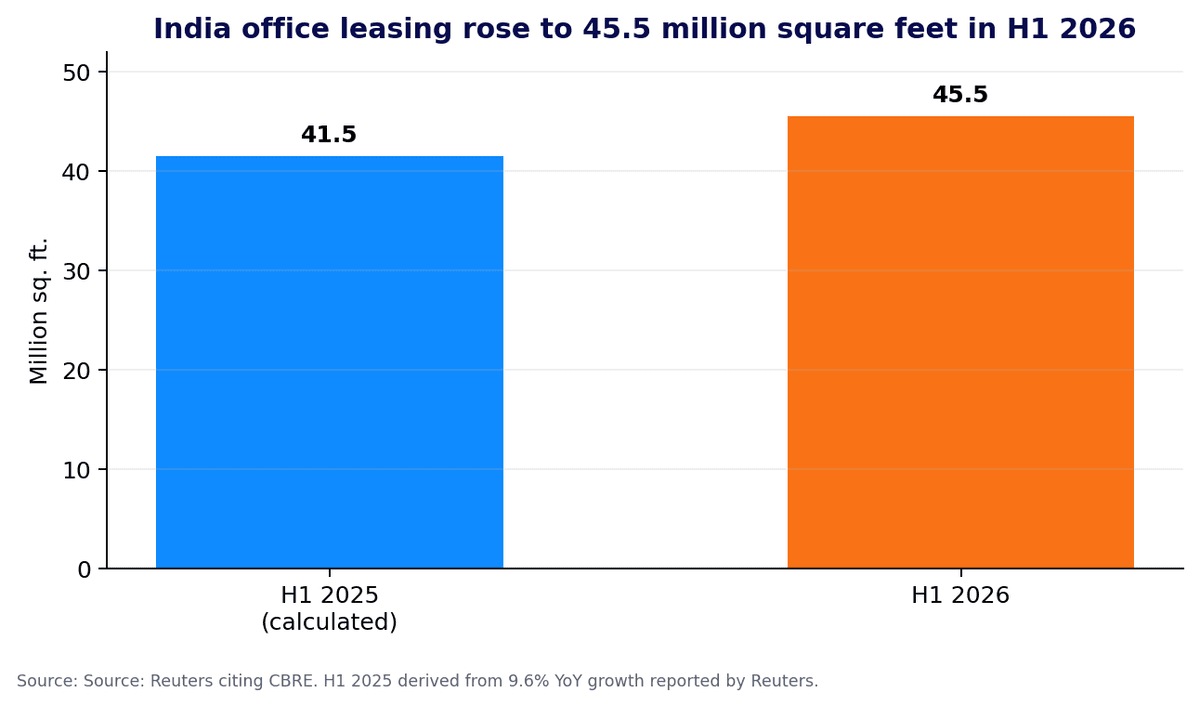
Chart 1: India office leasing growth adds pressure on facility service operations.
Source: Reuters / CBRE
TL;DR
Best ITSM tools for facility management should support work orders, asset tracking, mobile field updates, approvals, vendor coordination, and SLA escalation.
DGlide is a strong fit for mid-market facility management teams that need ITSM, FSM, ticketing, and workflows in one place.
Facility teams need tools that can adapt quickly without turning every workflow change into a long IT project.
Enterprise suites work better for very large organizations with dedicated platform teams and strict governance needs.
Most facility management companies need fast configuration, easy field adoption, and clear cross-team visibility more than a heavy system.
The right ITSM tool should help teams resolve issues faster, track ownership clearly, and reduce operational delays.
What Does Search Intent Reveal About Facility Management ITSM in 2026?
The best ITSM tools for facility management companies are being judged on operational fit, not feature count. Google AI Overview treats this keyword as a facilities service management query, with work orders, asset tracking, space usage, ticketing, and preventive maintenance as the main decision filters.
The top-ranking pages show the same direction. They evaluate tools by request management, automation, integrations, administration effort, asset visibility, mobile workflows, and implementation capacity. The missing layer is who owns the workflow after go-live.
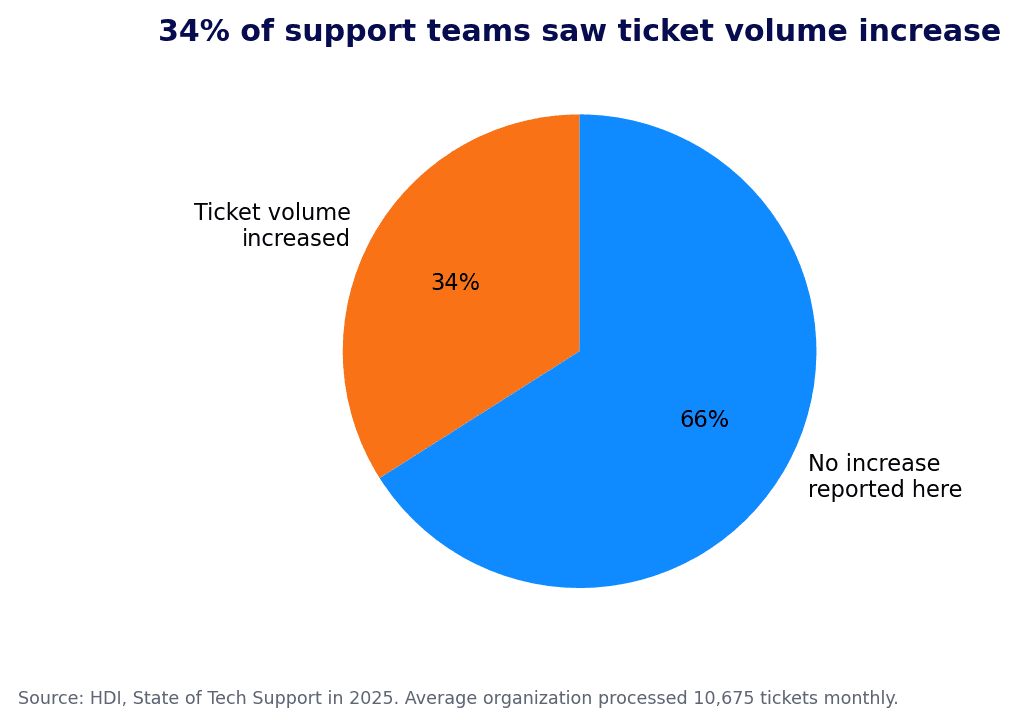
Chart 2: Rising support ticket volume makes routing and SLA ownership more important.
For a facility company, that ownership question decides adoption. If every form change, approval branch, or site-specific SLA rule needs IT intervention, the facilities team goes back to calls and spreadsheets.
DGlide fits this search because its ITSM workflows and field service workflows sit close together. Requests, approvals, work orders, SLA logic, dashboards, and mobile updates can be configured around how the facility team actually works.
How Should Facility Management Companies Evaluate ITSM Tools?
Facility management companies should evaluate ITSM tools against the full request journey. A request begins with an employee, tenant, branch manager, machine operator, or site supervisor, then moves through triage, approval, assignment, field action, vendor coordination, and closure proof.
A normal IT service desk handles the ticket. A facility-ready ITSM platform handles the work around the ticket. That difference decides whether the system becomes useful or becomes one more tab nobody opens.
Evaluation area | What facility teams should check | Why it matters |
Request intake | Portal, email, QR, mobile, and forms | Requests arrive from many channels. |
Work order flow | Assignment by site, asset, skill, and urgency | Manual routing delays service. |
Asset history | Asset ID, location, AMC, and past faults | Repeat issues need context. |
SLA logic | Escalation by asset, location, and priority | Each request type needs its own SLA. |
Mobile closure | Photos, notes, checklist, and signature | Work closes at the site. |
Configuration ownership | Ops can edit forms, stages, and routing | Processes change fast. |
This is where many tools fall short for facility management companies. They track the request, but they do not model the handoff between IT, admin, engineering, vendors, and site teams.
DGlide’s Field Service Management page covers work orders, scheduling, technician workflow, asset details, job status, service notes, and customer confirmation. Its Ticket Management page covers assignment, escalation, centralized tracking, and SLA management.
8 Best ITSM Tools for Facility Management Companies
The best ITSM tools for facility management companies differ by company size, workflow complexity, and change ownership. The list below is alphabetical so the evaluation stays fair and easy to scan.
Each tool can support service management. The real test is physical work, multi-site adoption, and change ownership.
Atomicwork
Atomicwork fits AI-first IT teams that want employee support through workplace channels like Slack and Microsoft Teams. For facility management companies, it works best when the main problem is employee service intake.
The buyer should test whether asset service, site work orders, vendor coordination, and mobile closure sit naturally in the product.
DeskDay
DeskDay fits IT teams and MSPs that want a modern service desk with automation and multi-channel support. It makes sense when the service desk is central and facility work stays simple.
For recurring maintenance, asset faults, vendor assignment, and mobile closure, the team needs to see a real facility workflow.
DGlide
DGlide fits facility management companies where IT tickets, admin requests, service jobs, and field work overlap. It brings ITSM, FSM, ticketing, forms, approvals, dashboards, SLA logic, mobile access, and workflow changes into one configurable operating layer.
This makes DGlide a strong fit for Indian and Middle East teams that have outgrown WhatsApp and spreadsheets. Facility managers can change stages, approvals, escalation rules, and checklists without waiting for a long IT cycle.
FMX
FMX fits organizations that need facilities-first work orders, preventive maintenance, scheduling, and equipment tracking. It is more facility management native than many generic ITSM tools because the workflows begin with physical assets and operational requests.
The trade-off is ITSM depth. FMX can suit campuses, schools, and property teams, but companies needing ITSM, field coordination, and cross-team approvals should check fit carefully.
InvGate Service Management
InvGate fits teams that want ITSM workflows with a cleaner interface and structured service management. It is often considered by mid-market IT teams that need ticketing, service catalog, asset visibility, and workflow control.
For facility management companies, InvGate works best when IT remains the main owner of service management. If facilities owns forms, field steps, vendor handoffs, and SLA branches, DGlide becomes more relevant.
Ivanti Neurons for ITSM
Ivanti Neurons fits companies that want ITSM, IT asset management, discovery, endpoint management, and service workflows in one environment. It is relevant when IT governance and asset visibility matter most.
Facility teams should still test daily adoption. Preventive maintenance, vendor coordination, mobile closure, and adoption must work for supervisors, not only IT administrators.
ManageEngine ServiceDesk Plus
ManageEngine ServiceDesk Plus fits IT teams that want broad service desk coverage with cloud or on-premise deployment options. It is useful when IT owns incident, request, asset, change, and SLA management.
The gap appears when facility teams need frequent process edits without scripting or admin dependency. The buyer should test how quickly business users can change approval paths and technician checklists.
ServiceNow Workplace Service Delivery
ServiceNow Workplace Service Delivery fits large enterprises and campuses with deep workflow governance, complex reporting, and mature platform administration. It is strongest where scale and governance justify the effort.
The trade-off is fit for mid-market facility management companies. A team needing faster ownership can spend more time adapting to the suite than improving service.
WOW Layer: The Facility Workflow Gap Diagnostic
The best ITSM tools for facility management companies should pass a workflow gap diagnostic before a buyer signs the contract. This test checks whether the platform can run the messy middle between request logging and physical resolution.
Most rankings compare modules, pricing, and AI claims, then leave the buyer to discover workflow gaps after rollout. That is too late for a facility company handling daily requests across offices, factories, campuses, or client sites.
Diagnostic question | Pass signal | Failure signal |
Can facilities change forms? | Ops edits fields and stages directly. | Each change needs IT. |
Can requests branch by asset and SLA? | Lift, HVAC, cleaning, and access route differently. | All requests follow one queue. |
Can technicians close work on mobile? | Proof attaches to the job. | Closure happens later. |
Can vendors stay in the trail? | Vendor updates stay visible. | Updates move to email. |
Can approvals cross teams? | Routing stays inside the system. | Approval status sits in inboxes. |
Can dashboards show site exceptions? | Site heads see blocked work. | Reports show volume only. |
A facility management company should not buy an ITSM tool until this test is answered. A demo that only shows ticket creation is not enough.
DGlide is built around exactly this gap. Its Living Service Model idea means workflows adjust as operations change, while the platform still keeps the request trail structured, auditable, and visible.
Which ITSM Tool Fits Which Facility Management Operating Model?
The best ITSM tools for facility management companies depend on who owns the workflow after go-live. If IT owns every change, an enterprise ITSM suite can work. If facilities owns daily process changes, a configurable operations platform becomes a stronger fit.
This is the decision most buyers miss. They evaluate software based on the demo team’s ability to configure it, not their own team’s ability to change it later.
“FM leaders face steady workload growth supported by modest budgets and constrained staffing.” Nickalos Rocha, Director of Benchmarking, IFMA IFMA’s inaugural FM Workload Index reading was +43, based on 1,400+ global responses. |
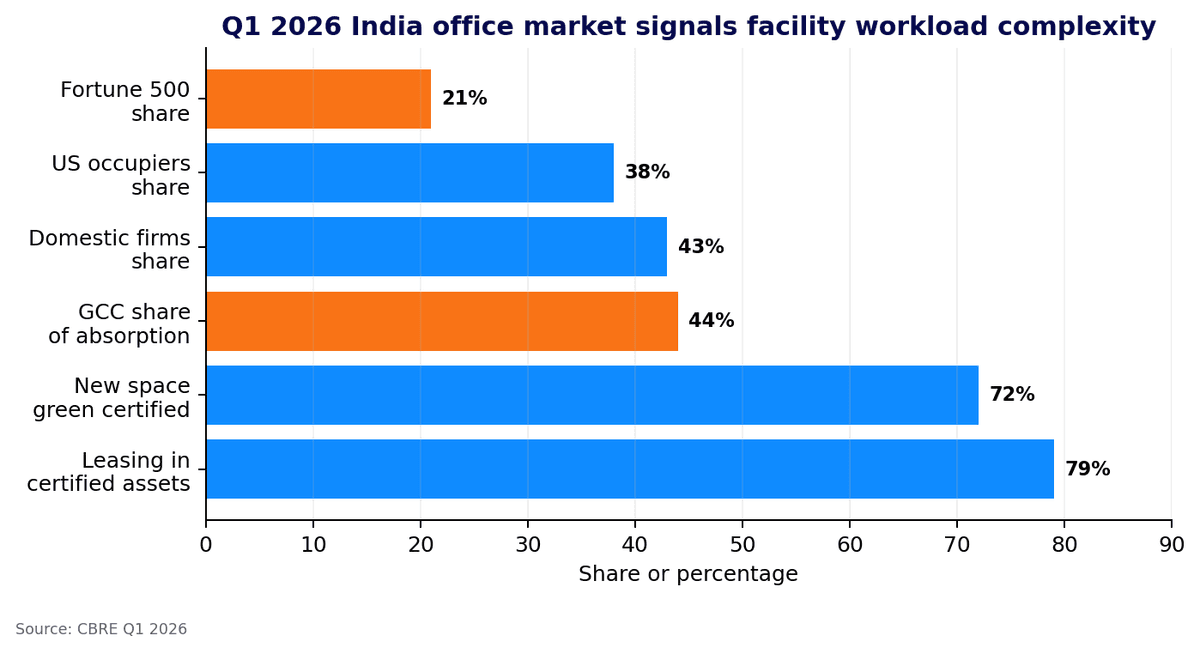
Chart 3: Certified space, GCC growth, and large occupiers increase service expectations.
Source: CBRE Q1 2026
Operating model | Best fit | Why |
Large global enterprise campus | ServiceNow | Deep enterprise governance. |
IT-led mid-market service desk | ManageEngine or InvGate | Structured ITSM coverage. |
AI-first employee support | Atomicwork | AI-first workplace intake. |
Facilities-first campus operations | FMX | Facilities-first work orders. |
MSP or IT service team | DeskDay | Modern service desk coverage. |
IT plus facilities plus field teams | DGlide | ITSM, FSM, ticketing, and mobile work together. |
The practical implication is simple. A facility company with lean teams cannot afford software that needs a specialist every time a site head asks for a new approval path.
That is why DGlide should sit high on the shortlist for facility management companies between roughly 200 and 800 employees. It gives facility, IT, and operations leaders a shared system without turning every workflow change into a project.
What Goes Wrong When Facility Teams Pick the Wrong ITSM Tool?
The wrong ITSM tool makes facility operations look organized while the real work continues outside the system. Tickets exist, but assignment, vendor follow-up, closure proof, and SLA recovery still happen through calls, inboxes, and WhatsApp groups.
This is the risk burned buyers recognize first. They have already seen a system go live, get praised in the rollout meeting, then fail because supervisors and technicians could not use it during a real service day.
Failure mode | What it looks like after rollout | How DGlide is designed to reduce the gap |
Portal adoption gap | Supervisors still assign manually. | Forms and routing stay connected. |
SLA blindness | Breaches appear after escalation. | Timers and escalations stay in flow. |
Asset context gap | Technicians lack fault history. | Asset notes move with the job. |
Vendor black box | Vendor updates sit outside. | Approvals and updates stay visible. |
Change dependency | Every edit needs IT. | Business users adjust forms. |
This is not a feature-count problem. It is an operating-fit problem, and it becomes expensive when the facility team finds out six months after purchase.
DGlide is not the right fit for every buyer. A global enterprise with complex CMDB governance and a large platform administration team may still prefer a heavier suite. A mid-market facility company that needs fast adoption, field visibility, and no-code change ownership should evaluate DGlide earlier.
Why Should Facility Management Companies Choose DGlide?
DGlide works well for facility management companies because facilities work does not stay inside one department. A single request often touches IT, admin, engineering, vendors, housekeeping, finance, and the site manager before it is closed.
DGlide connects those handoffs through ITSM, FSM, ticketing, workflows, approvals, and mobile field updates. It maps the system to the business process, not the reverse.
DGlide is especially relevant when the current setup looks like this:
Requests arrive through WhatsApp, calls, email, QR forms, and verbal complaints.
Facility supervisors assign work using memory, not skill, location, or workload.
Asset history sits outside the ticket.
SLA breaches are noticed after the client escalates.
Vendors update work through email screenshots.
IT owns the tool, but facilities owns the service outcome.
DGlide answers these problems through configurable service flows, SLA routing, mobile task updates, field visibility, approval paths, dashboards, and audit trails. Its pricing page also shows plans with configurable workflows, forms, approvals, dashboards, self-service portal, mobile app, audit logs, ITSM, and FSM.
If the current facility service flow is split across WhatsApp, Excel, email, and a rigid ticketing tool, the first step should be diagnostic. Book a DGlide workflow gap assessment with one real request flow.
It is a diagnostic call, not a sales pitch. The team leaves with a clearer view of the gap.
Conclusion
The best ITSM tools for facility management companies are not only service desks. They are operating systems for requests, assets, approvals, vendors, technicians, and SLA commitments across physical spaces.
DGlide stands out for mid-market facility management companies because it connects ITSM, FSM, ticketing, and no-code workflow changes in one practical setup. The right tool should reduce workarounds, not add a cleaner interface on top of them.
FAQs
What are the best ITSM tools for facility management companies?
The best ITSM tools for facility management companies include Atomicwork, DeskDay, DGlide, FMX, InvGate, Ivanti, ManageEngine, and ServiceNow. The right choice depends on workflow ownership, field service needs, asset tracking, and SLA complexity.
Why is DGlide a good ITSM tool for facility management companies?
DGlide is a good ITSM tool for facility management companies because it connects requests, approvals, SLAs, work orders, and field updates. It fits teams that need IT, facilities, vendors, and site staff working from one process.
Should facility management companies use ITSM or FSM software?
Facility management companies usually need both ITSM and FSM capabilities. ITSM manages requests, approvals, and SLAs, while FSM manages work orders, technicians, scheduling, and mobile closure.
What should facility management companies check before buying ITSM software?
Facility management companies should check request intake, asset tracking, SLA logic, mobile closure, vendor workflows, and no-code configuration. A demo should show a full facility workflow, not only ticket creation.